Tuesday, 27 June 2017

Top 10 Driver Updating Tools For Windows

Today computer has become a generous thing we use for our daily activities. Because computer can help you to perform so many task in an accurate and easy way. But in some cases, computers become inefficiently not working in a normal way it's suppose to, Due to not Updating your computer windows drivers to the latest windows driver. Here we introduce you the Top 10 Driver Updating Tools to update your coputer Windows driver to the latest driver.

Top 10 Driver Updating Tools For Windows

1. Driver Booster


Driver booster is one of the best free tool to update Your computer's​ windows driver to a latest windows. Driver booster is compatible with all version of Windows driver and is a satisfactory tool for both free and paid users.

2. Slim Drivers


Slim drivers is also one of the best​ free tool that can help you to have a new windows update on your computer. With some features which the tool can have you like backuping your currently windows installed on your computer and uninstalling windows driver.

3. Driver Talent


Driver talent is another tool which can help you update your computer. This tool Will automatically scan and download driver. But you most browse have to browse the file. The file size, version and released date is versible to see at the front page of the tool.

4. Driver Identifier​


Driver identifier is one of the best freeware driver update tools with a unique feature that beat all the tools mentioned above. If your windows is fully cleaned,then you have a chance that you might not have the network drivers to connect to a network.

5. Device Doctor


Device doctor is a free windows tool that can scan your computer and check for new windows update.

6. Driver Clouds


Driver clouds works in different way, it is a free driver update that is unique, it's runs from the browser it's self. Users need to install a program on their computer and then update the to it's website.

7. Driverpack Dolution


Driverpack allows you to configure your computer in one click,  even without thinking about the system configuration. At the same time, program  has mode for Advanced users with additional features.

8. Snappy Driver Installer


Snappy driver installer lite is ideal if your internet is slow or you don't plan on using the tool to install / update drivers very often. You need to download indexes via the app  to scan  your hardware

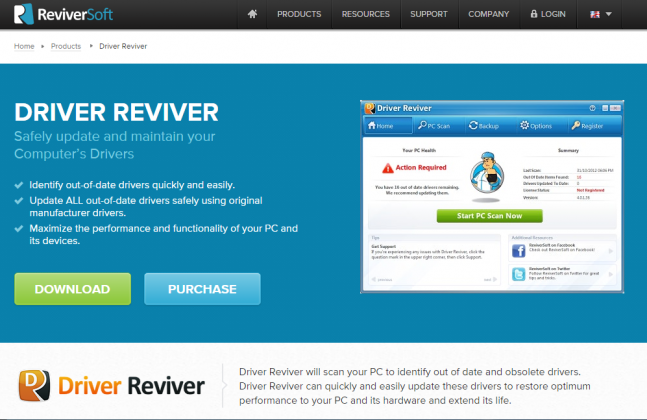
9. Driver Reviver


Driver reviver will scan your PC to identify out of date and obsolete drivers. Driver reviver can quickly and easily Update, these drivers to restore optimum performance to your PC and it's  hardware and extent it's life.

10. Driver Support


Driver support with active optimization can assist your search for drivers at the respective manufacturers website for free. Driver support  provides an innovative way to diagnose issues with your PC, resolue those issues through support and driver matching technology, and optimize your PC's performance.

Above all are the Top 10 Driver Updating Tools For Windows, using one of this 10 listed driver tools, your windows will never lack any kind of drivers on it, is this article helpful?? Your shares and comments will be appreciated.

Download iOS 11 Public beta on Your iOS Device

iOS 11 developer beta has been around for a while and right now, Apple has released the public beta for iOS 11. The Public beta does not require a developer account and anyone with an Apple ID can download it.

While the iOS 11 developer beta comes with redesign dock, dark mode, unfload unused app, a design control center and lots more.

Where Can I Download it?

Go to beta.apple.com/profile to download the configuration profile for your device. 

Once you install, you will be asked to restart your iOS device. After the device restarts, navigate to Settings > General > Software Update and you will see the public beta as an update just as you would any other iOS update.

Since it’s a public beta update, definitely there will be bugs. So if you don’t have any redundant iOS devices, I’ll suggest you wait for the final version when it released.

SOURCE

Simple Way To Hide Your Files Such As Musics, Images And Videos On Your Android Devices

Have you been looking for away to hide your videos,music, image and any other files on your phone and you couldn’t find a better solution to that or you are finding it deficult to do it, well your problem has been solved.

Causes on this post am going to be teaching how to hide your videos,music, image files etc. on any Android phone.

Also am going to be introducing you to an Android application called Gallery Vault cause that is wat will be making use of in this tutorial.

Gallery Vault is a fantastic privacy protection app to easily hide and encrypt your photos, videos and any other files that you do not want others to see.

Gallery Vault  can hide its app icon and keep your privacy absolutely safe. You can import your private images and videos in this secure vault, and nobody knows the existence of it.

What’s more, Gallery Vault  has the beautiful design, it provides you the smooth and amazing media browse experience.

Highlight features:

• Hide photos, hide videos and hide
any other types of files

• The hidden files are all encrypted

• Support hiding icon, and no one knows the existence of Gallery Vault except you.

• Support hiding files in SD card and moving your encrypted files to SD card to save your device storage, including Android 4.4(KitKat), 5.0(Lollipop), 6.0(Marshmallow) and 7.0(Nougat)+.

• Integrated with Private Web Browser and support downloading all images and videos in web page with just one tap

• The beautiful, smooth and elegant user experience
No storage limitation to hide photo and hide video

• Shake your phone to close Gallery Vault in a hurry

• Support hiding and playing GIF images

• Support Break-in Alerts and know who is trying to break-in

• Support Fake Passcode and show fake content when you input fake passcode

• Support Fingerprint (Only support samsung device with fingerprint scanner.

HOW DOES IT WORKS?

STEPS

1) Download and install gallery vault from Google play store launch the app and it’s will ask you to set a password just set the password you want to use and click on done.

it will take you to a page were your videos and image files are stored, look at the bottom of the page you will see a sign that looks like a cross,click on it and a pop up will appear like this(new folder, other files, videos and pictures.

3)now to hide your videos, image and others files just click on any of the files and it will take you to the file folder of the files on your phone,all you just have to do here it to mark as many of the videos, image or any files you want to hide and click on add, it will take to a folder page, just choose the folder you want to hide the file on and click on it and the files will automatically be encrypt.

Now for you to be sure that the files have been hide successfully just go the to gallery of your phone or the folder were the files where stored on your phone and sreach for it there,you will find out that the files are not longer there,

To see the files launch gallery vault Input your password and you will find your files on it

3) to unhide a file long tap on it a pop up will appear at the bottom of the app just click on the icon that looks like a key, select the path you want the file to be unhide on, click ok and wait for few seconds and you are done.

Camera Performance of Oukitel U22 4 Camera (N25,500)

This is still one of the cheapest phone in the market and I sincerely doubt if you can get smartphone of this spec here in NG. Oukitel U22 comes with 4 cameras (a 13MP+2MP primary cameras and 8MP+2MP for the rear), Android 7.0 nougat out of the box.

It sports  5.5-inch display with HD resolution, MT6580A 3G enabled chipset, 2 GB RAM, 16 GB of internal storage, 2700 mAh battery, fingeprint scanner, dual SIM support+ individual microSD slot and more.


Check out the camera sample taken below;

For the price, it goes for $69.99 (N25,500) obtainable on AliExpress or Gearbest. You can even use your barter card to place the order.

YomiProf

How to Recover Any Deleted Photos, Files or Doc on Andriod Phones or Tablets

The most valuable information on your Android devices are your pictures, files or video. And we’ve all accidentally mistakenly hit the delete button without knowing what else to do. But don’t panic; you can recover everything you’ve accidentally deleted on your phone.

There are many tools out their but I’m going lay more emphasis on DiskDigger

DiskDigger can undelete and recover lost photos and images from your memory card or internal memory. No rooting necessary!  Whether you accidentally deleted a photo, or even reformatted your memory card, DiskDigger's powerful data recovery features can find your lost pictures and let you restore them.

The free version of DiskDigger can recover photos and videos only (recovering videos requires your device to be rooted).

The Pro version can recover other types of files besides photos and videos, and also allows uploading recovered files over FTP (again, recovering any types of files besides photos requires your device to be rooted).

Where Can I download it?

Download it here

Steps to Recover Your Files

>>Launch the app, it will display two options: "Basic scan" and "Full scan." The "full" scan functionality is available only on rooted devices, whereas the "basic" functionality is available regardless of whether your device is rooted.

>> If your device is not rooted, tap the "Start basic photo scan" button to continue, and continue to the "Scanning for files" section below.

>> When you use the app on a rooted device, you may see a Superuser request window. Make sure to press "Allow" in order to grant DiskDigger root access.

>> select the types of files that you'd like to recover. For better performance, please select only the file types that you actually need.

>>Wait while DiskDigger recover your files


>>You can now save the recovered files to your device, or an app or via FTP.

With DiskDigger, you have nothing to worry about loosing any files or photos on your Android because it will recover all.

Have you used it before? Tell us your experience...

Credits To ::YomiProf::

Monday, 26 June 2017

How To Make Money Online Without Having A Blog

There are several ways of making money online, some people has made up to 1million naira online and even more than that, it is this method that they are using to make there money and it is easy and lawful. How To Make Money Online Without Having A Blog.


3 Ways To Make Money Online Without Having A Blog
There are many ways to make money without having a blog but I will mention 3 only. The 3 are listed below:-
1. Selling E-Books:-
This is the best way to make money online without having a blog, ebooks comprise of what you learn and you will now write it in PDF Formats then you start selling it to people who need it, but let me give you a hint, Nigerians don’t use to buy ebooks, they love getting things for free and it is not right so you sell your ebooks to foreigners.
2. Web Designing:-
There are a lot of people doing this and didn’t have a blog like me I help people to design school website, personal blog , social media and others, and you will collect certain some of money for your services.
3. Creating Logos For Bloggers:-
You can also earn money by creating logos because most of the bloggers doesn’t know how to create a logo, you can also help people to design events logo online and others.
Are you having a blog? You can check how to make money with your blog here also.
You can also create mobile apps for bloggers and also collect money from there, click here to learn about that.
To get real money from this you will advertise your services or products on blog, websites, social media and forums because lot of people didn’t know you are there and they real need your serves so you have to let them know by advertising, you can also advertise on gurusfound, click here for that.
Conclusion
That is all, you see to make money online is simple and easy so which one will you like to choose in the 3 methods? This is a question you can use the comment box to answer this.


– Gurusfound.com.ng

LG Announced World’s First 77 inch Transparent,OLED & Flexible Display

Wow! This is a record breaking achievement: LG announced few days ago that it’s created the world’s first flexible, transparent 77-inch organic light emitting diode (OLED) display.

The display is capable of outputting Ultra HD visuals at a resolution of 3840-by-2160 with transparency rated at 40 percent. As for flexibility, it can be rolled up like a tube with a radius of 80mm. You can imagine how much easier that makes shipping such a huge screen.

Infact, it’s taller than Tom Cruise. According to Google, Cruise is 5 feet 7 inches, or 170 centimeters tall, and as this display is 77 inches on the diagonal with an aspect ratio of 16:9, that means its longest side measures 170.5 centimeters. It’s taller than Cruise, but not if Cruise wears shoes.

This display is impressive because of the combination of features it manages to include. A 77-inch OLED display on its own is a fantastic achievement, but to also support 4K output, be transparent, and very flexible just adds to what LG managed to achieve here.

This isn't a display aimed at the home user; LG is looking at digital signage, smart desks, augmented reality, and even car displays as markets for this type of screen. It took 59 months for LG to complete this project.

Sunday, 25 June 2017

Download Spotify Premium APK Mod Version For Free.

Here’s the Spotify Premium Apk mod Download for FREE UNLIMITED DAYS PREMIUM HACK 2016 Full Spotify apk latest download music player for Android phone unlimited with no ads and with Spotify offline apk you can listen to unlimited offline songs for free.

With this Music App, you’ve got used to a world of music. Spotify is a free internet music streaming service that allows you to listen to your favorite artist’s music from a catalog of more than 20-million music tracks, build playlists, and get tips from additional people or from Spotify’s own suggestions.

Spotify Premium Apk, which allows you with endless skipsad-free songs, the new running tool, and also save music offline. Spotify Music is the best online music streamer for Android in the market right now! There are other competitors like Google Play MusicApple Music being the two big ones, spotify premium apk has proved to be ahead of the game and is being used by millions of users worldwide.

Spotify Premium APK

Spotify premium Apk

Apk Updated: November 29, 2016Apk Size: Varies with deviceApk Installs: 100,000,000 – 500,000,000Apk Requirement: Varies with deviceApp DeveloperSpotify Ltd.Is It Working: YES! We are using it, if it stops working we will mod it ASAP!Spotify Premium Apk Mod DownloadScroll down below till you see the Download Section.

We’re always making changes and improvements to Spotify Premium Apk mod. To make sure you don’t miss a thing, just keep your Updates turned on.

Spotify premium apk Android additionally supports gapless playback and mix-fading between monitors, therefore there are not any unexpected breaks. Besides style-based areas, Spotify allows you create custom radio stations from any record, performer, album, or playlist. Just tap the radio icon and you are set.

Spotify remains one of the most popular mobile streaming audio providers and is the best ever. The free version has tons of stuff, playlists that are collaborative, and songs; the Spotify PremiumApkMod variation provides enhanced sound quality, offline songs, ad-free experience  and other great stuff.

Spotify premium apk HACK/MOD FEATURES:

Unlimited skipsUnlock repeatingUnlock shufflingUnlock seekingUnlock track selectionAD-FREEBypass DRMAnd Much More!

SPOTIFY PREMIUM APK INSTRUCTIONS:

Download the Spotify premium Apk from the link belowBefore you install it, uninstall the older version of Spotify from your SmartphoneInstall the ApkSign up or login using your Spotify account, don’t worry it’s safeCheck the Premium features (Ignore the “get premium”  button as you already have Premium on :))Like us on Facebook at: http://facebook.com/stemar0 Enjoy!Still, don’t get it working? feel free to drop us a message at http://facebook.com/stemar0 our response time is less than 10 minutes.

SPOTIFY PREMIUM APK:

DOWNLOAD FROM ZIPPY SHARE

DOWNLOAD FROM  DBREE
 

These are the latest MODS, they are safe, keep track of updates by liking us on Facebook: http://facebook.com/stemar0 Message us if you have any questions.

How To Use More Than One Official Whatsapp On Your Android Phone.

Have you ever imagined using 2 (two) Whatsapp Account on a single android (APK) phone, believe me you can even install 3 Whatsapp on your android phone, Don’t think its impossible just follow the steps below to enjoy dual Whatsapp on 1 android phone.

This tutorial is going to feature two step to slump this method, carefully apply the steps and enjoy this.


USING GB WHATSAPP

GB WHATSAPP is an app modded by the GB team which enable you to use dual whatsapp on your Android device

With this, you can run two whatsapp on your device and this app came with many MOD features and customizations

Below is the list of the new features of GB whatsapp 

– Support whatsapp call

– Hide your (last seen) Privacy

– Ability to download and install themes 

– Send files up to 30mb instead of 16mb

– Save whatsapp status of 250 characters instead of 169

– Upload 90 images at once instead of 10

READ  Download Super Dimensional Rush apk

– Copy your friend status updates

– Ability to copy 2 or more post without attaching the post date and time 

– Press link on your friends status

– Chat with attached contact name sent to you without adding to contact list

– Mark important messages and read it later 

– Possibility to display picture in conversation 

– Possibility of Deleting messages according to a specific time 

– How You Can Install GB Whatsapp 

STEPS TO INSTALL AND ACTIVATE GB WHATSAPP

Download the latest GB WHATSAPP From this link, Launch your original WHATSAPPand make sure you backup your messages and chats then uninstallInstall and launch GB WHATSAPP, Verify and Restore back your messages .Download Original WHATSAPP from play store then use your second Sim card to verify.


NOTE: GB WHATSAPP do expire at a frequent basis bookmark this page to check up for the latest and download

USING PARALLEL SPACE FOR ANDROID

Parallel space works very well for using dual whatsapp on your android phone, Infact I would really recommend this if you are going to try it out, not only you will be able run 2 whatsapp but also dual facebook, instagram, bbm and other social apps you will like to be cloned on your android phone follow to steps below to learn how parallel space works.

Download parallel space on google play store and install.Open the downloaded and installed appYou will notice different square like shape on the next display, this boxes are meant for selecting apps tap on the first box and chose any app that you wished to be cloned select whatsapp and openIt will show a welcome message just press continue and go on with the process.

READ  How to Factory Reset Your Android Phone or Tablet through recovery mode

Thanks for taking your time reading this,  now before you go kindly share this tutorial Cause some people are in dear need of it.  And if you know any other method kindly hit our comment box.

How to Recover lost or deleted text message on Android

How to get any text message  deleted on your android phone back without any problem.

If you mistakenly got an important message deleted you will feel like what the fuck’ but you don’t need those shits instead you should act fastly to recover it.

Lost messages can be easily be recoverable, but it won’t be recovered until when the memory portion in which it was saved is over written by an app update, Take a sip of water and grab your phone and pc then follow learn how to recover lost messages.

READ  Ulefone Armor 2 Specifications, Reviews and Price

Steps to Take to Recover lost or deleted text message on your Android 

1. Goto your phone settings and Enable Developer option.

2. Goto developer options then then USB DEBUGGING, and tick the box in front of it or swipe the button right depending on your android version

USB Debugging Activation

3. Download and install free Wondershare trial and connect your phone to your pc with USB debugging enabled.

4. Launch the wondershare app and follow the prompt to scan and analyze your android device memory.

5. When its done, you can then preview all your deleted and undeleted data on your android phone, Open the message folder, preview and select any message you wish to recover then click Recover at the down side to restore them to your device or rather save them to your pc.

Please before you leave our site kindly  share this post.

See The Reason Why You Shouldn't Think Of Buying Tecno Phones

There are a lot of reasons why you shouldn’t buy tecno phones, and a lot of people are using tecno phone, even me am using tecno self, and i discovered something so i have to let you know, you might be planning to buy new phone, Please don’t buy tecno phones for some reasons.


3 Reasons Why You Shouldn’t Buy Tecno Android Phones

See Reasons Why You Shouldn’t Buy Tecno Android Phones , Yes now i will write about the reasons now.

Battery:-
Battery is one of factors to be determined when you want to buy phones, battery is essential that without battery the phone can’t on, it is like no heart in the body, so without battery no phone and without heart no life.

Tecno phones battery aren’t strong enough, you can ask me why? Yes it is not because my tecno phone is now 5months when i bought it the battery was so strong to the extent that i can use it for 2days without charging but now it drains faster, i can’t even use it in a day without charging so i will advise you to get others phones like Infinix, Gionee And Others.

Rooting of Phones:-
A lot of people can’t do without rooting there phone, when you root your phone you can do anything like increasing the phone ram, changing the font and others, to root some tecno phones are difficult especially Tecno w series and other tecno phones with android version 6.0 Upward ..

Storage issues:-
This is the main problem am having with my tecno w3, i can’t move app from phone storage to memory card and for this reason i didn’t have any games, videos and musics what am only having there is only social media apps and browsers and some little files.


Conclusion

Now i can see with this reason people won’t want to buy tecno phones again. i didn’t say you shouldn’t buy it but after some months the battery will become weak and it will drain faster.

Now if you aren’t buying tecno phones again, then which phone did you want to buy? as fo rme i want to buy infinix hot 4. so you can use the comment box for that and i will tell you should you buy it or not

Is it helpful? did you really gain something from this? if yes, why don’t you share this to friends and family because sharing is caring.

Thanks.

3 Standard Things You Need To Know About Infinix Phones

Infinix phones are good and it is use By lot of people especially tertiary students (University Students). The students knows what Is good almost all of them are using The phones because of the battery, camera and it features, The phones price isn’t too costly than others phones like gionee, Samsung, iphones and others.

Now today I will give you guys 3 Reasonable Facts That You Need To Know About Infinix Phones. There are some fact you need to know about infinix phones.

3 Reasonable Facts That You Need To Know About Infinix Phones

The 3 reasonable facts will be listed below:-

1. Battery:- Almost All infinix phones battery are sealed, they are strong and good to use. But you must not be lackadaisical about the usage of the battery because it is sealed one and if It get spoil, that may be the end of that phone or you take it to qualified phone engineer if he can do it or not.

2. Operating System:- Almost all the infinix phones has the ability to upgrade to another android version, for example if the default android version is 6.0 you might want to change it to 7.0, we will give you a tutorial on how to do that also

3. Features:- This is the main reasons why people like infinix phones, thy are cool and easy to use, especially when it comes to gaming part, infinix phones can do that and also some infinix phones are having finger print which you can use it as security to unlock your phone.

Conclusion

So now with this features above did you also love infinix phones, these are some reasons why people loves infinix phones.

Is it helpful? How is the phone to you? Can you ever tthink of buying it?

Don’t Forget to share this to friends and family because there is love in sharing

Thanks for coming and reading, have a lovely week!!

Infinix Note 4 Confirmed! Coming With X-Pen

This is what most Infinix fans have been waiting for and now it is officially confirmed that Infinix Note 4  will be launching on 3rd of July 2017… And Yes, its coming with X-Pen.

Earlier rumored specification suggested that it will be coming with Android O Nougat out of the box, and edge-less design with X-Pen, dual rear and selfie camera with flash. For now, the X-Pen is confirmed and the D day is next month.

You can use your mind to figure out the price… What do you think?

Happy Eid-el-Fitri to all my Muslim friends!


– YomiProf

Saturday, 24 June 2017

Checkout The Importance Of Author’s Photo On Blog Posts

It is essential for you to add your photo on your blog as a blogger due to lot of reasons. This post will give you more about that, the main reason why you should put your photo on your blog. importance of putting author’s photo.


Who Is An Author In Blogging?

Author in blogging can be defined as a person who writes, manages, maintain posts and do lot of activities on the blog like approving comments, replying peoples comments, sharing of posts to social media etc.

An Author can be the owner of the blog or just manage the blog for owner.

The Importance Of Putting Author’s Photo On Blogs

There are many importance of putting author’s photo on blogs. so i will give just 2 reasons. The 2 are listed below:-

1 . Recognition:- this is the main reason thy you should add your photo to your blog, people will recognize you and also if they knew your social media accounts they will always follow you and like your posts on social media, And also when you are going people will be saying “That is the owner of gurusfound” people will respect you.

2.  Help Financially:- If someone is a crippled, if some people abroad love his blog and how he use to write his posts they may decide to help him financially, or take him outside his country to solve his problem.

That is All For Today.

Conclusion

Did you know the reasons why you should put your photo on your blog now?

If yes, why don’t you share this to others bloggers because sharing is caring.

How Do I Activate My Payoneer Master Card After Arrival?

Now that you’ve received your Payoneer Master Card, the next thing for you to do is to activate it and get ready for trading. I’m going to show you how to activate your Payoneer card in easy steps below;

How Do I Activate My Payoneer Master Card?

1.      Log in to your Payoneer account

2.      Make sure that the right card is selected in the drop-down menu at the top of the screen as seen below


3.      Make sure the last four of your Payoneer Master card is the same with what you have at the drop down

4.      Click on Activate


5.      Enter the required information which includes your 16 digits pin and your new 4 digits password

6.      Accept the terms and condition


7.      Click on Activate

You should get a confirmation message message that your new card has been activated.

You can also watch the 2min video on how to activate your Payoneer Master Card

What Else?

It’s now time to fund your card and begin trading, shopping with it anywhere around the world. I can always recommend you to a trusted seller where you can get Payoneer funds from.

Congratulations!

6 Cool Reasons You Should Sign Up For Payoneer Master

The crave to shop and receive payments online is increasing daily and I’m pretty aware some of you are not new to what I’m about to share with you today. Some of you have perhaps gotten the card but have never used it for ones probably because you don’t know what you can do with it.

I’ve heard series of complain about Barter virtual card but I’m sure the company is working on it to make it better for online usage considering the facts that it’s still new.


Payoneer Master Card is an international Master card issued to you free of charge. Payoneer supports over 200+ countries, so where you are from doesn’t really matter; it is more than PayPal or Payza and for some countries residents it is the only option.

It is different from your normal Debit Master Card issued by your local banks. Here are the simple reasons you should get yourself a Payoneer Master Card and it will be delivered to your house address Free of Charge.

6 Reasons You Should Get a Payoneer Master Card

1. Receive Payments From Thousands of Companies Directly to your Payoneer Account: Thousands of companies from around the globe are partnered with Payoneer for sending mass payments.

2. Withdraw Money from Local ATM: You can bring the money you have earned from freelance marketplace into your Payoneer Card. Withdraw it from any local ATM around you. This is the best feature of Payoneer; using the Payoneer MasterCard you can withdraw your earnings from any MasterCard supported ATM in over 200 countries. 

So that means you do not require have a bank account to withdraw your money from Payoneer.  For per ATM cash out, a $1.35 will be charge each time in the USA and $2.50 for outside the USA. Also, fees by the ATM service provider will apply.

3. The card is free of charge, and it will be delivered to your house/office address free of charge

4. Use for PayPal: Payoneer card is compatible with Paypal, you can link your Paypal account to Payoneer and continue your transaction without any hassle.


5. Buy Anything Online: You can use the card to buy anything online from AliExpress, Bestbuy, Gearbest, Ebay, Amazon etc without any restriction. Online shopping is fun when you have the right tool.

6. Withdraw Money Directly to Your Bank Account: You can add your bank account to your Payoneer account and receive money directly. There are no fees for adding one or more bank accounts. And the withdrawal fee as very low compared to the ATM withdrawal.

Who Needs It?

Everyone needs this Payoneer Master Card with or without PayPal account; So long you love to shop online, you should get one for yourself.

How Can I Get it?

Sign up here 

After which your card will be delivered to you without paying a dime. The good news is, on successful signup, Payoneer will give you free $25 if you share your link with someone else, and the person receives $100 in his/her account. So what are you waiting for?

I have verified Payoneer fund sellers where you can easily get your card funded at cheaper rate. With this card, you don’t need Dollar Master Card. Ask me questions!

WhatsApp Latest Updates: Share Files of All Type

Lots of updates are currently going on with WhatsApp and right now, WhatsApp is testing some new functionality that is sure to be welcome by its many users.

It is one of the most anticipated features of all time even though WhatsApp users are still expecting the Recall features. For the time being, WhatsApp does not support the share of all file types, so you're forced to use third-party apps in some cases. The good news is the situation might change in the not so distant future.


The new File sharing features recently upgraded will allow you to send any type of files to your WhatsApp contact. Any type of files you can think of at all and it currently enables users to share a maximum file size of 100MB (Android), 128MB (iOS) or 64MB (desktop).

It is currently been rolled out to some beta users… with time, it will get to everybody. The roll out of sharing of all file types is for iOS, Android and Windows Phone users!

List Of Android Phones With 4GB RAM For 2017

A lot of people buy phone because of ram and rom while some buy because of camera and it appearance, as for me i buy phones according to their ram, rom and their android version. Our Topic for today is List Of Android Phones With 4GB RAM For 2017.

List Of Android Phones With 4GB RAM For 2017

HUAWEI HONOR MATE 9


Platform: Android 7.0 Nougat
SIM Type: Dual Micro SIM4G: YesScreen Size: 5.9 Inch IPS LCD Capacitive Touch-ScreenScreen Resolution: 1080 x 1920 pixelsBuild: PlasticColours: Space Gray, Moonlight Silver, Champagne Gold, Mocha Brown, Ceramic White, BlackProcessor Type: Hisilicon Kirin 960 Chipset, Octa-core (4×2.4 GHz Cortex-A73) CPU.Processor Name: KirinRAM: 4GBInternal Storage: 64GBExternal Storage: Yes , up to 256GBRear / Back Camera :Dual 20 MP +12 MP AF Camera with Dual LED & Dual Tone.Front Camera : 8MP with Soft Flash.Battery: 4000mAhSensors : Fingerprint, accelerometer, gyro, proximity, barometer, compassPrice: Over $300

TECNO PHANTOM 6 PLUS

SIM Type: Dual SIM (Micro)OS: HiOS Based on Android 6.0 (Marshmallow)4G LTE: YesScreen Size : 6.0 FHD LTPS Capacitive TouchscreenScreen Resolution: 1080 x 1920 pixelsBuild: Metal BodyColours: Champagne Gold, Gold & SilverProcessor Type: Deca-core 4x 2.5 GHz + 4x 2.0 GHz + 2x 1.4GHzProcessor Name: Helio x20Graphics Processor: Mali-T860 GPURAM: 4 GBInternal Storage: 64 GBExternal Storage: Micro SdCardBack / Rear Camera : 21MP AutoFocus Sony camera with dual LED FlashFront Camera : 8MP with LED FlashSensors: Finger Print Scanner, Eye Scanner, Accelerometer, ProximitySecurity: Finger Print & Iris ScannerBattery: Non-Removable 4050 mAhPrice: Over $200

INFINIX ZERO 4 PLUS

SIM Type: Dual SIM (Micro)OS: HiOS Based on Android 6.0 (Marshmallow)4G LTE: YesScreen Size : 5.9 FD IPS Capacitive TouchscreenScreen Resolution: 1080 x 1920 pixelsBuild: Curved Diamond Metal Uni-BodyColours: Lilac Grey, Gold and Silver colors.Processor Type: MediaTek Helio X20 10X Core ProcessorProcessor Name: Helio x20Graphics Processor: Mali-T880RAM: 4 GBInternal Storage: 32 GBExternal Storage: Micro SdCard Up-To 128GBBack / Rear Camera : 20.7MP AutoFocus with dual LED FlashWith LASER & OIS.Front Camera : 13MP with LED FlashSensors: Fingerprint Scanner, Accelerometer , Gyro, proximity,  Orientation, X-Charging, Upgraded Voice Control to UnlockBattery: Non-Removable 4000 mAhPrice: Over $200


MEIZU PRO 6

Platform: Android OS, v6.0 (Marshmallow)
SIM Type: Dual Micro SIM4G: YesScreen Size: 5.7 Inch Super Amoled DisplayScreen Resolution: 1080 x 1920 pixelsBuild: PlasticColours: Gold, Silver, GrayProcessor Type: Exynos 8890 Octa, Octa-core (4×2.0 GHz Mongoose & 4×1.5 GHz Cortex-A53)RAM: 4GBInternal Storage: 64GBExternal Storage: Yes , up to 256GBRear / Back Camera : 12MP Laser AF With Dual LED.Front Camera : 5MP with Soft Flash.Battery: 3400mAhSensors :Fingerprint, accelerometer, gyro, proximity, compass, heart ratePrice: Over $300

Conclusion

Now Why Phone will you like to buy out of this 4gb ram phone, as for me i prefer that infinix, what did you prefer? you can use the comment box for that and you will be answered.

is it helpful? i think you know the name of phones with 4gb ram now, if yes then why don’t you share this to others to learn from this also.

Thanks

All What You Need To Know About VPN, It Types And It Uses

VPN is a greater tool for the people it is essential because of lot of things, people uses VPN to hide locations and some people uses it in free browsing cheats.

What Is VPN?

virtual private network (VPN) extends a private network across a public network, and enables users to send and receive data across shared or public networks as if their computing devices were directly connected to the private network. (“In the simplest terms, it creates a secure, encrypted connection, which can be thought of as a tunnel, between your computer and a server operated by the VPN service. Applications running across the VPN may therefore benefit from the functionality, security, and management of the private network.

More About VPN

VPNs may allow employees to securely access a corporate intranet while located outside the office. They are used to securely connect geographically separated offices of an organization, creating one cohesive network. Individual Internet users may secure their wireless transactions with a VPN, to circumvent geo-restrictions and censorship, or to connect to proxy servers for the purpose of protecting personal identity and location. However, some Internet sites block access to known VPN technology to prevent the circumvention of their geo-restrictions.

Types Of VPN

1. Remote Access VPN

2. Site – to – Site VPN

1. Remote Access VPN

Remote access VPN allows a user to connect to a private network and access its services and resources remotely. The connection between the user and the private network happens through the Internet and the connection is secure and private.

Remote Access VPN is useful for business users as well as home users.

A corporate employee, while traveling, uses a VPN to connect to his/her company’s private network and remotely access files and resources on the private network.

Home users, or private users of VPN, primarily use VPN services to bypass regional restrictions on the Internet and access blocked websites. Users conscious of Internet security also use VPN services to enhance their Internet security and privacy.

– See more at: https://www.vpnoneclick.com/types-of-vpn-and-types-of-vpn-protocols/#sthash.FsGHJCpV.dpuf

2. Site – to – Site VPN


A Site-to-Site VPN is also called as Router-to-Router VPN and is mostly used in the corporates. Companies, with offices in different geographical locations, use Site-to-site VPN to connect the network of one office location to the network at another office location. When multiple offices of the same company are connected using Site-to-Site VPN type, it is called as Intranet based VPN. When companies use Site-to-site VPN type to connect to the office of another company, it is called as Extranet based VPN. Basically, Site-to-site VPN create a virtual bridge between the networks at geographically distant offices and connect them through the Internet and maintain a secure and private communication between the networks.

Since Site-to-site VPN is based on Router-to-Router communication, in this VPN type one router acts as a VPN Client and another router as a VPN Server. The communication between the two routers starts only after an authentication is validated between the two.


Types of VPN protocols

The above two VPN types are based on different VPN security protocols. Each of these VPN protocols offer different features and levels of security, and are explained below:

1. Internet Protocol Security or IPSec:

Internet Protocol Security or IPSec is used to secure Internet communication across an IP network. IPSec secures Internet Protocol communication by authenticating the session and encrypts each data packet during the connection.

IPSec operates in two modes, Transport mode and Tunneling mode, to protect data transfer between two different networks. The transport mode encrypts the message in the data packet and the tunneling mode encrypts the entire data packet. IPSec can also be used with other security protocols to enhance the security system.

2. Layer 2 Tunneling Protocol (L2TP):

L2TP or Layer 2 Tunneling Protocol is a tunneling protocol that is usually combined with another VPN security protocol like IPSec to create a highly secure VPN connection. L2TP creates a tunnel between two L2TP connection points and IPSec protocol encrypts the data and handles secure communication between the tunnel.

3. Point – to – Point Tunneling Protocol (PPTP):

PPTP or Point-to-Point Tunneling Protocol creates a tunnel and encapsulates the data packet. It uses a Point-to-Point Protocol (PPP) to encrypt the data between the connection. PPTP is one of the most widely used VPN protocol and has been in use since the time of Windows 95. Apart from Windows, PPTP is also supported on Mac and Linux.

4. Secure Sockets Layer (SSL) and Transport Layer Security (TLS):

SSL (Secure Sockets Layer) and TLS (Transport Layer Security) create a VPN connection where the web browser acts as the client and user access is restricted to specific applications instead of entire network. SSL and TLS protocol is most commonly used by online shopping websites and service providers. Web browsers switch to SSL with ease and with almost no action required from the user, since web browsers come integrated with SSL and TLS. SSL connections have https in the beginning of the URL instead of http.

5. OpenVPN:

OpenVPN is an open source VPN that is useful for creating Point-to-Point and Site-to-Site connections. It uses a custom security protocol based on SSL and TLS protocol.

6. Secure Shell (SSH):

Secure Shell or SSH creates the VPN tunnel through which the data transfer happens and also ensures that the tunnel is encrypted. SSH connections are created by a SSH client and data is transferred from a local port on to the remote server through the encrypted tunnel.

Learn more about VPN One Click

Uses Of VPN

People Uses It to change their locationsit helps in cheat stuffIt gives people opportunity to browse internet for free

And So On.

Conclusion

Please Some of these definitions aren’t written by me but i put the credit there .

is it helpful? did you really understand the meaning of vpn now. if yes, why don’t you share this to friends and family.

Thanks